How to detect AI agent activity in your CDN logs: the four request classes, the user agents and fields to capture, how to tell training crawls from live retrieval, and how to verify what is real.
Ex-Stanford AI Researcher specialising in search algorithms and LLM optimisation.
July 27, 2026
Published: July 27, 2026|Updated: July 27, 2026
13 mins
TL;DR
Client-side analytics cannot see most AI agents. Non-rendering crawlers never fire your tag, bot filtering drops the ones that do, and surviving events carry no request-level fields. CDN logs are the only complete record.
Model four classes, not one "bots" bucket. Training crawl, search index crawl, direct agent fetch, and human referral each mean something different commercially.
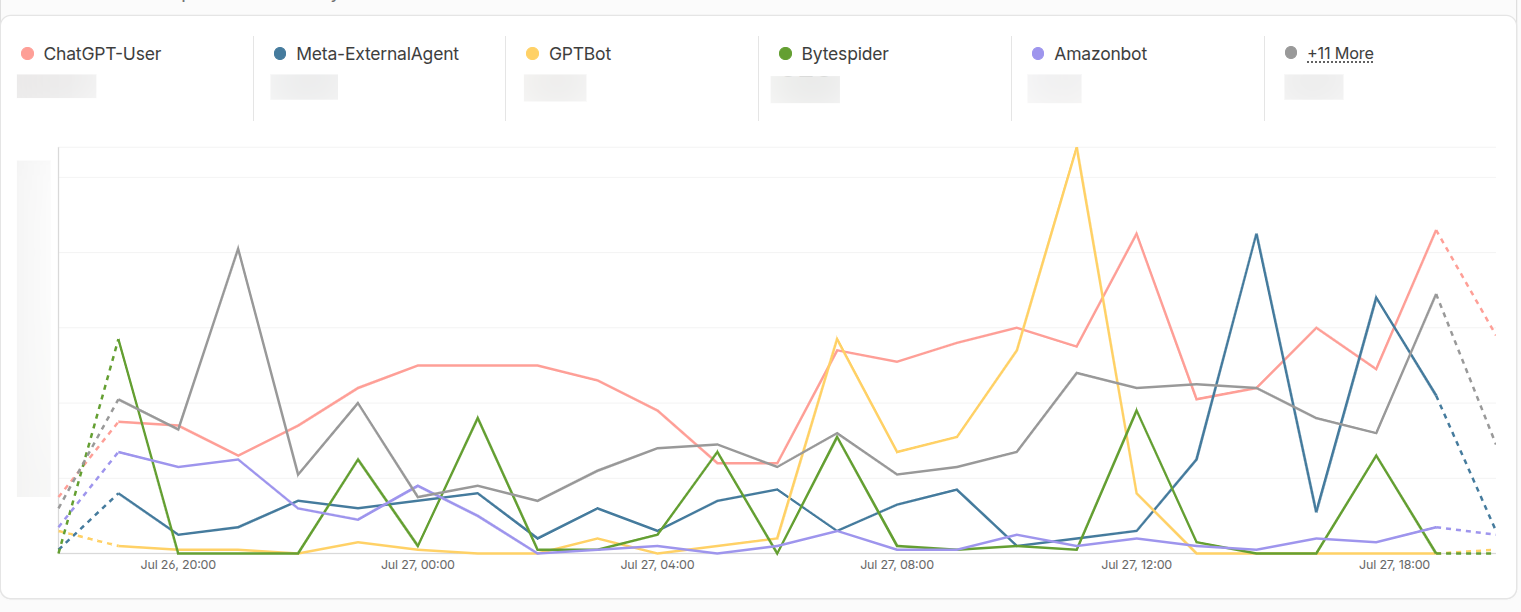
Direct agent fetches dominated our traffic. ChatGPT-User made 8,600 requests in eight days. GPTBot made 1,246. The class most likely to be filtered out was the largest AI signal on the site.
User agent strings are not evidence. 6.9% of requests claiming to be ChatGPT-User failed IP verification, and every one of those was scanning us for credentials.
Retrieval modes have behavioral fingerprints. Training runs as concentrated batch sweeps. Live retrieval runs flat around the clock and revisits a narrow set of URLs.
Most teams measure AI traffic with a client-side analytics tool, which means they are measuring only the fraction of it that runs JavaScript. Everything else gets discarded at ingest as bot noise, including the requests AI assistants make at the exact moment a real person asks a question about your category. This guide covers how to detect AI agent activity in your CDN logs, how to tell a training crawl apart from live retrieval, and how to model the result in a warehouse/database you own. Every number in it comes from our own logs.
Your analytics tool fires from a JavaScript tag in a browser. That single design fact creates three separate blind spots, and only one of them is a settings problem you can fix.
Non-rendering crawlers never execute the tag. GPTBot, ClaudeBot, CCBot and most training crawlers request your HTML and leave. They never run JavaScript, so they never fire an event. They are invisible by construction.
Bot filtering removes what does render. Some agents do execute JavaScript and can fire your tag. Mixpanel, GA4 and similar tools then usually drop those hits on user-agent match, which means the most commercially interesting traffic gets discarded at ingest.
Surviving events carry no request-level detail. Even when a hit lands, you get no response status, no cache status, and no client IP. You cannot tell whether an agent received your content or a 403 from your WAF.
CDN logs sit at the edge, before any of that. Every request is recorded whether or not JavaScript runs. Keep your product analytics for humans and run this as a parallel pipeline, because the two answer different questions and should not be merged into one funnel.
The central modeling decision is to stop treating AI traffic as one thing. Four classes matter, and they have different owners and different time horizons.
Class
What it is
What it tells you
Training crawl
Corpus collection for model training
Presence in future training data. No near-term signal.
Search index crawl
Building the index that live answers draw from
Citation eligibility. If a page is never fetched here, it cannot be cited.
Direct agent fetch
A person asked a question and the model fetched your page to answer it
Live buyer intent, before any human lands on your site
Human referral
A person clicked through from an AI answer
Session, conversion, revenue
The second class is the one that decides whether you are eligible to appear in answers at all, and our breakdown of how AI systems decide what to cite covers what happens to a page after it is retrieved.
The third class is the one most teams lose, and it is the one worth the most. It is the request made before a person is referred to you. Sometimes a click follows seconds later. Often it never comes, because the answer gets consumed inside the assistant.
A direct agent fetch with no matching referral is not a failure. It is dark-funnel influence, and this is the only place you can measure it. For the referral side of the same picture, see our guide to tracking ChatGPT and Perplexity traffic in GA4.
We ran this on discoveredlabs.com for eight days in July 2026, using Cloudflare's httpRequestsAdaptiveGroups dataset. One comparison carries the whole argument:
ChatGPT-User made 8,600 requests. GPTBot made 1,246.
The user-triggered retrieval agent outnumbered the training crawler by roughly seven to one. If you filter AI traffic as a single bot category, that is what you are throwing away.
Capture these and you can answer every question in this article. The names below are Cloudflare Logpush fields, with equivalents for other providers underneath.
Field
Why you need it
EdgeStartTimestamp
Event time, and your partition key
ClientRequestUserAgent
Primary classifier
ClientIP
Verification. Hash or truncate if your privacy policy requires it.
ClientRequestHost
Splitting multi-domain traffic
ClientRequestPath
Which content is being retrieved
ClientRequestReferer
Detecting the human referral class
EdgeResponseStatus
Whether the agent actually received your content
CacheCacheStatus
Whether agents hit cache or origin
EdgeResponseBytes
Catching near-empty responses served to agents
If your plan exposes them, add BotScore, VerifiedBotCategory, and the JA4 TLS fingerprint. The last one catches spoofed user agents that string matching passes.
Equivalents. Fastly uses req.http.User-Agent, client.ip, req.url, req.http.Referer and resp.status. CloudFront uses cs(User-Agent), c-ip, cs-uri-stem, cs(Referer) and sc-status. Akamai DataStream uses ua, cliIP, reqPath, referer and statusCode.
One caution. Do not capture full query strings without review, because they carry PII and access tokens.
Pattern ordering. Test ChatGPT-User before any looser GPT pattern. Get this backwards and your most valuable class collapses into your least valuable one, silently.
The policy tokens.Google-Extended and Applebot-Extended are documented as robots.txt policy controls, not crawler identities. Google-Extended governs whether content Googlebot already fetched can train Gemini. Even so, we logged 140 requests as Applebot-Extended/0.1 and 2 as Google-Extended. Since neither operator documents these as crawlers, treat their appearance as a signal to verify the IP before counting the traffic as either operator's.
Keep Googlebot in its own class as well. It is not an AI crawler, though its fetches feed AI Overviews, and its volume will swamp your AI numbers if you mix them.
Telling the modes apart when the user agent is not enough#
A user agent tells you what a client calls itself. It does not tell you what mode it is operating in. You need that, because operators rename agents often, some agent traffic does not identify itself at all, and a spoofed string looks exactly like a real one until you check behavior.
Three signals separate the modes, and all three come from fields available on any CDN plan.
Training crawls run as scheduled batch sweeps. Live retrieval runs continuously. Measure requests per hour across a week, then divide the peak hour by the mean hour.
Operator
Mode
Peak / average
GPTBot
training
8.32
ClaudeBot
training
4.49
OAI-SearchBot
search index
2.78
Applebot
search index
2.12
PerplexityBot
search index
1.92
Claude-User
live retrieval
1.87
ChatGPT-User
live retrieval
1.39
GPTBot did almost all of its work inside a single two-hour window and went quiet for the rest of the day. ChatGPT-User never stopped, because it aggregates demand from every timezone at once. Anything above 4 with a tight window is a sweep. Anything below 2 and continuous is live retrieval.
Live retrieval returns to a small set of URLs. Sweeps go wide and shallow. Divide requests by distinct paths.
ChatGPT-User requested 184 distinct paths and hit each one 32.3 times on average. Training crawlers sat between 6 and 10. A high revisit rate across a narrow path set is the strongest single indicator that you are looking at live retrieval rather than crawling.
This one has a direct content consequence. Classify each request by file extension, then measure what share are CSS, JavaScript, fonts or images.
Operator
Asset share
Renders?
Applebot
36.1%
Yes
ClaudeBot
30.1%
Yes
PerplexityBot
8.9%
Partially
GPTBot
2.2%
Barely
ChatGPT-User
0.1%
No
ChatGPT-User requested almost no assets at all. It reads the HTML your server returns and nothing more. Anything your application injects client-side after load is invisible to it.
That matters if you run a client-rendered stack. The agent responsible for the largest share of live AI retrieval on our site does not execute JavaScript, while ClaudeBot and Applebot clearly do. So there is no single answer to whether AI crawlers run JavaScript. It varies by operator, and you should measure it against your own logs rather than trusting a blanket claim. Our notes on rendering and indexation cover the remediation side, the agentic browsing checker tests how your pages behave for browser-based agents, and our agentic browsing readiness guide covers the browser-based agents specifically.
One more tell sits in control files. ChatGPT-User fetched no robots.txt and no sitemap across the entire window, while ClaudeBot pulled sitemap.xml 88 times. Systematic discovery looks different from a one-off retrieval against a URL the model was already holding. Googlebot also pulled llms.txt four times, which is worth watching if you maintain one, and our llms.txt template covers what to put in it. For the access controls these agents are reading, see our guide to robots.txt and meta robots.
These thresholds come from one site over one week of sampled data. Treat the method as portable and the numbers as a starting point to recalibrate against your own traffic.
Anyone can send User-Agent: ChatGPT-User. For internal reporting, string matching is usually fine. For anything that gates access, drives spend, or reaches a board deck, verify.
We checked every request claiming to be ChatGPT-User against OpenAI's 286 published IP prefixes.
Requests
Share
IP inside OpenAI's published range
3,083
93.1%
Outside it, unverified
230
6.9%
The unverified 6.9% was not random noise (some malicious bots etc.).
That is credential harvesting wearing a ChatGPT-User costume, running from rented Google Cloud addresses. All 128 credential-scan requests came from unverified IPs. Not one came from a verified OpenAI IP.
A classifier built on user agent alone would have counted every one of those as live buyer intent and reported it to someone as a demand signal.
Published IP ranges. OpenAI publishes openai.com/gptbot.json, openai.com/searchbot.json and openai.com/chatgpt-user.json. Perplexity publishes perplexity.ai/perplexitybot.json and perplexity.ai/perplexity-user.json. Google publishes its crawler and user-triggered fetcher ranges. Refresh these daily into a table and join on IP containment.
Forward-confirmed reverse DNS. Reverse-resolve the IP, confirm the hostname belongs to the operator, then forward-resolve that hostname and confirm it returns the original address. The forward step is not optional, because anyone who controls reverse DNS on their own IP can otherwise claim to be Anthropic. Use this where no published feed exists, which currently includes the Claude crawlers.
Web Bot Auth. The direction of travel. It is a Cloudflare-led IETF Internet-Draft built on RFC 9421 HTTP Message Signatures, where an agent signs its request and publishes a public key at a well-known URL. It is not yet an IETF standard, so build toward it rather than depending on it. Start capturing the Signature-Agent header now so you have the history when adoption arrives.
One nuance worth holding onto. Most AI operators run on AWS, GCP and Azure, so an address belonging to OpenAI this month may belong to an unrelated company next month. Use ASN as corroboration, never as your primary check.
Of the 409 distinct paths ChatGPT-User requested, 97.3% returned 200 and 2.5% returned 404. Strip out the credential scans and the remaining 404s turn into something useful - these are pages a model expected to exist and requested by name.
Every one is a competitor comparison we have not published. Nobody asked us to write them, and no keyword tool surfaced them, but assistants are actively looking for them on our domain.
Agent 404s are a content gap report that writes itself. Check yours before your next planning cycle, because no other data source produces this list.
Land raw log rows append-only, partitioned by date, with no transformation. Keep them so you can re-run classification when a new operator appears, which happens every few months.
Then put the taxonomy in a table rather than in code. This is the design decision that determines whether the pipeline survives contact with reality.
A new crawler appears and you insert a row. No deploy, no review cycle, and because rows are date-bounded you can still reprocess history correctly. A hardcoded CASE WHEN user_agent LIKE ... will be stale within a quarter and nobody will own it.
Join it to your logs, and fall back to referer matching for the human referral class:
CREATE VIEW ai_traffic AS
SELECT
  l.event_timestamp,
  l.request_path,
  l.response_status,
  COALESCE(r.operator, 'unclassified') AS operator,
  COALESCE(r.agent_class, CASE
      WHEN l.referer_host IN (
        'chatgpt.com','chat.openai.com','perplexity.ai',
        'claude.ai','gemini.google.com','copilot.microsoft.com')
      THEN 'human_referral' ELSE 'other' END) AS agent_class,
  v.is_verified
FROM cdn_logs_raw l
LEFT JOIN ai_agent_registry r
  ON LOWER(l.user_agent) LIKE '%' || LOWER(r.pattern) || '%'
 AND l.event_timestamp >= r.active_from
 AND (r.active_to IS NULL OR l.event_timestamp < r.active_to)
LEFT JOIN ip_verification v
  ON l.client_ip = v.client_ip AND r.operator = v.operator;
Referer is unreliable, so treat human referral counts as a floor. Some assistants strip it, some route through redirectors, and privacy settings suppress it. Say that in any report you build, before somebody asks you to explain a discrepancy.
Five metrics that lead to a decision. Resist reporting raw request counts upward, because volume without coverage is noise.
Metric
Definition
Decision it drives
Retrieval coverage
Distinct URLs fetched by index crawlers divided by total indexable URLs
Which content is invisible to retrieval
Direct agent fetch rate
Live agent requests per day, by path
Which pages assistants consult when a person asks something now
Fetch-to-referral ratio
Human referrals divided by direct agent fetches
How often being consulted becomes a visit
Agent error rate
Index and agent requests returning 4xx or 5xx
WAF or rate limiting quietly blocking retrieval
Crawl-to-citation lag
Days from first index fetch to first observed citation
Realistic expectations for new content
Check agent error rate first. It is the most common own goal, and the cheapest to fix. Retrieval coverage is the one to build a habit around, and our guide to crawlability and indexing for AI search covers how to close the gaps it exposes. Crawl-to-citation lag needs citation data alongside your logs, which is a separate pipeline covered in how to track AI citations.
On coverage versus volume, our data argues against the easier metric. We joined fetch counts to citation counts for our fifteen most-cited pages. All fifteen had been fetched, so retrieval access is a hard prerequisite. But the rank correlation between fetch volume and citation count came out at 0.42 across fifteen pages, which sits below the threshold for significance at that sample size.
The honest reading: a page that is never fetched cannot be cited, and fetching it more does not get it cited more. Manage coverage. Ignore volume. What actually moves citations is structure, and our analysis of two million AI citations covers which structural features carry weight.
Ship logs to storage. Cloudflare Logpush to object storage needs Enterprise. On lower plans, poll the request-level GraphQL dataset instead, accepting sampling and short retention.
Land raw, partitioned by date. No transformation.
Build the registry table, seeded from the user agent lists above.
Classify. Ship the four classes before you add verification.
Add IP verification. Daily feed refresh, then reverse DNS for operators without feeds.
Add mode fingerprinting once you have a few weeks of history.
Steps one through four take roughly a day of engineering time and deliver most of the value. Five and six are what make the numbers defensible when somebody senior questions them.
Once you can see which pages agents retrieve and which they cannot reach, the work shifts from measurement to content structure. That is where our CITABLE framework picks up, and the agent readiness guide covers the fixes this diagnostic will surface.
The traffic is already in your logs. Most teams are discarding it because a client-side tool decided it was noise, and the class being discarded most often is the one that indicates a real person is asking a question your content could answer. Four classes, a registry table, and IP verification will get you a defensible picture inside a week.
If you want a second pair of eyes on what your logs are showing, request a baseline AI visibility audit and we'll tell you where the gaps worth acting on are.
How do I detect AI crawlers on my website? Match your CDN logs against the published user agent list for each operator, then verify the client IP against that operator's published ranges. User agent matching alone is not sufficient, because the strings are trivially spoofed. In our logs, 6.9% of requests claiming to be ChatGPT-User failed IP verification.
Can AI crawlers execute JavaScript? It depends on the operator, and the difference is large. In our logs ClaudeBot and Applebot requested page assets at around 30% of their traffic, indicating they render. ChatGPT-User requested assets in 0.1% of its traffic, meaning it reads server HTML only. If your content depends on client-side rendering, measure this per operator rather than assuming.
How do I tell training crawls apart from live AI retrieval? Use the user agent first, since operators separate them. GPTBot is training and ChatGPT-User is live retrieval. Then confirm with behavior: training runs as concentrated batch sweeps with a high peak-to-average ratio, while live retrieval runs continuously and revisits a narrow set of URLs many times.
Why does Mixpanel filter out AI agent traffic? Because it is a client-side tool with bot filtering. Non-rendering crawlers never execute the tag, so they never appear. Agents that do render usually get dropped on user agent match. Neither behavior is a misconfiguration, which is why CDN logs are the right source for this rather than a settings change.
Do I need Cloudflare Enterprise to do this? For raw log export, yes, because Logpush is an Enterprise feature. On lower plans you can still query the request-level analytics dataset, though it is sampled and retention is short. Other CDNs expose equivalent fields under different names, and the method transfers to any of them.
Most AEO dashboards report rate moves without uncertainty bounds. Here's the math and the prompt-set, variance, and trend tests every measurement should pass.
Google AI Overviews does not use top-ranking organic results. Our analysis reveals a completely separate retrieval system that extracts individual passages, scores them for relevance & decides whether to cite them.
Our team analyzed network traffic from Google AI Mode in January 2026. The capture included 547 Google flows and over 1,300 total requests during AI Mode sessions. The findings paint a clear picture of how Google is preparing to monetize AI-generated search results.